QR Code Feedback: How to Collect Customer Feedback with a QR Code

QR code feedback means placing a printed code at the point of experience — on a table, a receipt, a poster or a hotel room card — that opens a short survey in the customer’s phone browser when scanned. It is the lowest-cost way to collect in-the-moment feedback across many locations, because it needs no hardware, no app and no contact details.
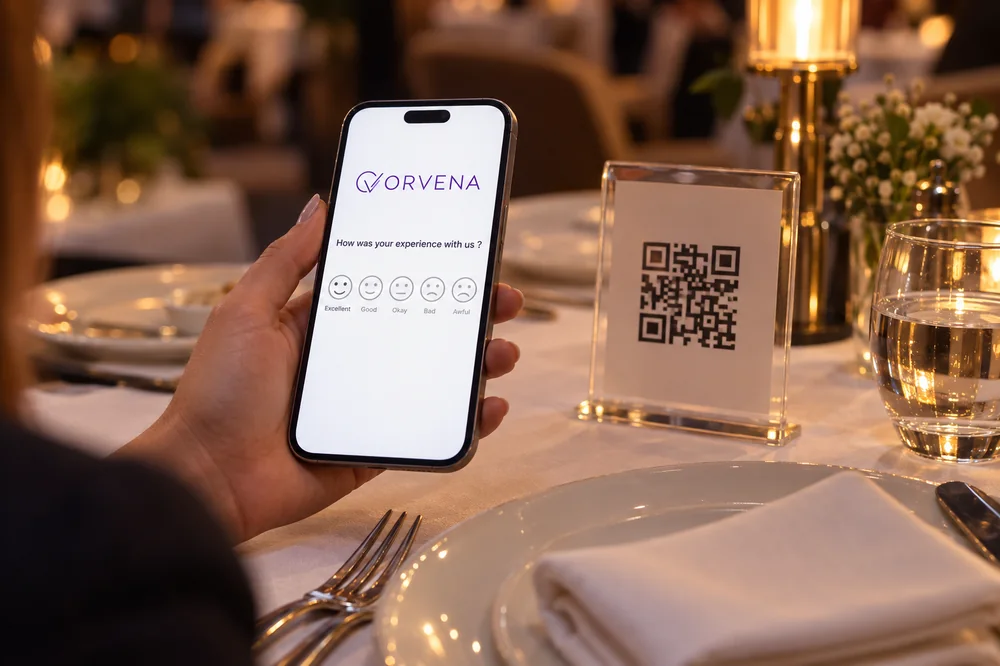
One code per location and touchpoint, a sign that says what happens and how long it takes, a survey that opens with a single one-tap question, and a named person who acts on low scores. Get those four right and a printed square becomes a live feedback channel.
Why use QR codes for customer feedback
Most feedback channels need something before they work: an email address, a phone number with consent, a device on a stand. A QR code needs only a printed surface. That makes it the natural choice where a device would be overkill — a restaurant table, a hotel room, a delivery package, a quiet corner of a branch — and a useful complement where a kiosk already exists, for customers who want to say more than one tap allows.
The trade-off is that QR feedback is passive. Nobody is prompted; the customer has to notice the code, take out a phone and decide it is worth half a minute. Placement, sign wording and survey length therefore decide the volume far more than the code itself. Our omnichannel feedback guide shows how QR fits next to kiosks, SMS and email.
How to collect feedback with a QR code, step by step
- Write a short survey first. Open with one rating question the customer can answer with a single tap — a five-face smiley or the 0–10 recommendation scale — then add at most two follow-ups. Show the comment box only after a low rating.
- Create one link per location and touchpoint. A code on the tables and a code at the checkout should feed separate streams, tagged with branch and touchpoint, or you will never know which experience an answer describes.
- Turn each link into a QR code. Use a link you control, so the survey behind a code can change without reprinting. Test the printed code with several phones, in the real lighting.
- Design the sign. Tell people what the survey is and what it costs them: “How was your visit? One question — scan here.” Make the code large enough to scan from arm’s length.
- Place it where the experience ends. On the table when the bill arrives, on the receipt, beside the exit, on the room desk — not on the entrance door.
- Route the answers. Decide before launch who receives low scores for each location and how quickly they must respond.
- Review weekly and move codes that underperform. A code with almost no scans is a placement result, not a satisfaction result.
Where to put QR codes, and where not to
| Location | Why it works | Tip |
|---|---|---|
| Restaurant and café tables | Guests have a pause while waiting for the bill | Table card at eye level, one code per section |
| Receipts and invoices | Every customer gets one while the transaction is fresh | Encode the store in the link |
| Hotel rooms and reception | Guests have time and privacy | Room card during the stay, a second code at checkout |
| Branch exits and service desks | Catches customers straight after the service | Pair with a kiosk; the QR code is the “tell us more” option |
| Packaging and delivery notes | Reaches customers you never meet in person | Link the code to the order channel |
| Washrooms, lifts and waiting areas | High footfall and idle moments | Keep the survey to one question |
Avoid places where scanning is awkward: moving queues, spots with no mobile signal, or anywhere customers are carrying bags or paying. Avoid a single code for the whole building, too — it produces one number that no manager owns. Hotels and restaurants often combine table and room codes with a terminal at reception, as described on the hospitality guest feedback page.
Questions that work on a QR survey
A QR survey competes with everything else on the customer’s phone. Keep it under a minute, make the first screen answerable with one thumb, and offer it in the languages your customers actually speak. A starter set:
- “How was your visit today?” — five faces; the headline question.
- “What was the main reason for your rating?” — waiting time, staff, cleanliness, availability, price, other; shown only after a low rating.
- “Is there anything we should fix?” — optional comment.
- “How likely are you to recommend us to a friend or colleague?” — 0–10, optional, if you track NPS.
- “May we contact you about your feedback?” — optional contact fields, only for customers who want a reply.
For question order and scales in more depth, see how to set up the perfect customer feedback survey template. If you are deciding between a satisfaction score and a recommendation score, the CSAT software and NPS software pages explain what each one measures.
How to get more scans
- Say how long it takes. “One question” beats a vague “give us feedback”.
- Say what happens next. “A manager reads every answer” persuades better than a prize draw, and does not tilt the sample towards bargain hunters.
- Ask at the right moment. A team member pointing at the code while handing over the bill does more than any design.
- Keep the code clean and visible. Laminated, unscratched and never hidden behind a menu stand.
- Show that feedback changes things. A small “You said, we did” note next to the code proves the survey is not a black hole.
From scans to action
A QR code is a collection point, not a strategy. The value appears when every answer lands in one system with its location and time, when low scores automatically reach the person who can fix them, and when QR answers can be read next to kiosk, SMS and web answers to the same questions. Without that, QR feedback becomes one more inbox nobody reads. Alerts, tickets and re-surveys are covered step by step in the closed-loop feedback guide.
How Qmeter handles QR code feedback
In Qmeter a QR code is a web channel: build the survey in the drag-and-drop builder, assign the channel to a branch and use its share link for the code — one channel per location or touchpoint. Answers arrive in real time with branch, service and time attached, negative ones open tickets with SLA timers, and the same template can also run on a feedback kiosk, by SMS and email, or on your website. The survey tooling is described on the customer satisfaction survey software page, and plans are listed on the public pricing page.
Frequently asked questions
How do I create a QR code for customer feedback?
Build a short survey in a feedback tool, copy the survey’s link and turn it into a QR code, either in the tool itself or with any QR generator. Use one link per location or touchpoint so answers are tagged automatically, test the printed code with several phones, and add a sign that says what the survey is about and how long it takes.
Are QR code feedback surveys anonymous?
They can be. A QR survey needs no login and no contact details, so a rating-only survey is anonymous by default. If you add an optional contact field — for example, so unhappy customers can ask for a call back — treat those answers as personal data under your privacy policy.
What is a good response rate for QR code feedback?
There is no reliable universal benchmark: scan rates depend on footfall, placement, sign wording and whether staff mention the code. Measure it yourself as answers per visitor or per transaction at each location, and compare locations with each other. A code with almost no scans usually has a placement problem, not a satisfaction problem.
Should I use a static or a dynamic QR code?
Point the code at a link you control. A dynamic code, or a stable survey link from your feedback platform, lets you change the questions, fix a typo or add a language without reprinting table cards and receipts. A code that hard-wires a one-off address is much harder to maintain.
QR code or feedback kiosk — which is better?
They solve different problems. A kiosk at the exit captures a one-tap verdict from far more of the people who pass it; a QR code costs almost nothing to deploy and suits tables, rooms, receipts and places where a device would be overkill. Many multi-location businesses use both: the kiosk for volume, the QR code for customers who want to say more.
What software do I need for QR code feedback?
Any survey tool can produce a link, but for several locations you want feedback software that tags answers by location, reports in real time, routes low scores as tickets and runs the same survey on kiosk, SMS, email and web, so every channel stays comparable.
See Qmeter in action
Collect, analyse and act on customer feedback — powered by AI.