Restaurant feedback form template
✓ Cloud or on-premise · ✓ Kiosk, QR, SMS, email and web · ✓ Live in one day
A restaurant feedback form template asks guests to rate their overall experience, then food quality, service, speed, cleanliness and value, with one question about what to improve. Put it on a QR code at the table so guests can answer while waiting for the bill, and keep the table version to three questions.
The restaurant feedback form template
Restaurant guests decide within minutes of leaving whether they will come back — and whether they will write a review. The best time to ask is between the last course and the bill: the meal is fresh, the guest is seated, and a manager can still walk over to the table. That is why this template is designed for a QR code at the table first, with a longer version for delivery and booking follow-ups.
The questions work for full-service restaurants, cafés, quick-service outlets and hotel restaurants. For quick-service, drop question 5 (pace of the meal) and ask about order accuracy instead.
Full version (QR code, email, SMS link or web) — 10 questions
- How was your experience with us today?
Answer type: 1–5 smileys (Awful → Excellent), required - How did you dine with us?
Answer type: Single choice: Dine-in · Takeaway · Delivery
Delivery has its own failure points (temperature, packaging, timing) — keep the data separate. - How would you rate the taste and quality of your food?
Answer type: 1–5 stars - Was your order correct and complete?
Answer type: Single choice: Yes · No - How would you rate the speed of service and pace of your meal?
Answer type: 1–5 stars - How friendly and attentive was your server?
Answer type: 1–5 stars
Optionally add a short choice list of server names or table sections to compare teams. - How clean and comfortable was the restaurant, including washrooms?
Answer type: 1–5 stars - How would you rate the value for money?
Answer type: 1–5 stars - How likely are you to recommend us to a friend?
Answer type: 0–10 scale (Net Promoter Score) - What one thing should we change before your next visit?
Answer type: Open text, optional
If you want to invite happy guests to leave a public review, show that invitation on the thank-you screen only after a 5 on question 1 — never before the private feedback.
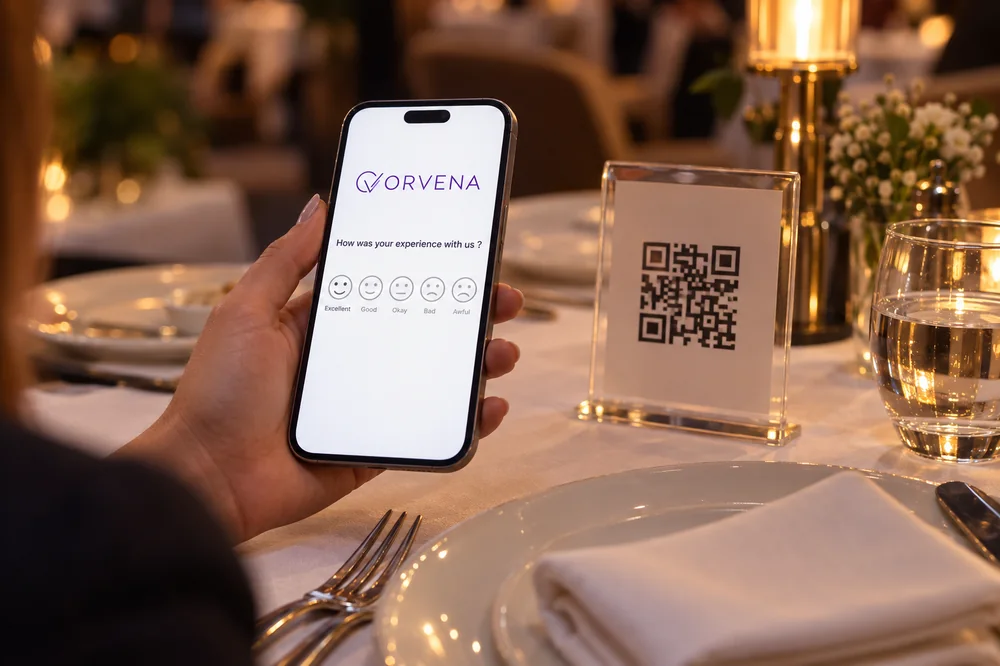
Short version for a kiosk or tablet (3 questions)
The table version takes about fifteen seconds and is meant to be answered before the bill arrives:
- How was your meal today?
Answer type: 1–5 smileys, required - What could have been better? (shown for 1–3)
Answer type: Multiple choice: Food · Service · Speed · Cleanliness · Price · Other - Would you like the manager to stop by your table?
Answer type: Yes / No + table number (not needed if each table has its own QR code)
One QR code per table or per section?
The way you print your QR codes decides what you can analyse later. Three common setups:
- One code for the whole restaurant. Simplest to deploy, but you cannot tell which table, section or server a complaint came from.
- One code per section or server station. A good balance for most restaurants: you can compare service across sections and shifts without managing dozens of codes.
- One code per table. Best for live recovery — the “manager visit” request arrives with the table number, so the manager can walk over within minutes.
Place the code where it is seen at the end of the meal: on the bill folder, a table tent or the receipt. A code that is only on the menu is gone by the time the guest has an opinion. Our guide to QR code feedback covers placement and wording in more detail.
When and where to run it
Different service models need different moments:
- End of the meal, before the bill — QR code on the table or bill folder, short version. The single most effective moment for dine-in feedback.
- At the exit or cashier — tablet in kiosk mode, short version. Works well for quick-service and food courts.
- After a delivery order — SMS link one hour after delivery, full version. Ask about temperature, packaging and timing.
- After a reservation — email the next morning, full version. Use the booking details so the guest does not have to type anything.
- Private events and group bookings — email to the organiser, event version. See the event feedback template for organiser questions.
How to analyse the results
Look at overall satisfaction (share of 4–5 on question 1) first, then compare the driver questions. Example: 150 table responses in a week, 126 of them 4 or 5 — 84% satisfied, with “Speed” the most common reason among the low scores.
- By meal period and day. Lunch rush, weekday dinner and weekend brunch are effectively different restaurants. Compare them separately.
- By section or server. If service scores differ consistently between sections, look at staffing and table allocation before blaming individuals.
- By dining type. Delivery scores usually lag dine-in; track their reasons (question 4 and comments) on their own.
- Food versus service. When food is rated well but overall satisfaction is low, the problem is almost always speed or service.
- Across branches. For groups with several outlets, the same template makes outlets directly comparable.
Closing the loop on low scores
In restaurants, closing the loop can happen before the guest leaves:
- A score of 1–2, or a “Yes” to the manager visit, sends an instant alert to the manager on duty with the table number.
- The manager visits the table, resolves what can be resolved and notes the outcome.
- For delivery and post-visit feedback, a ticket is created with the order details and a same-day response target.
- Weekly, review the closed tickets by root cause (kitchen, service, cleanliness, delivery partner) and fix the most frequent one.
More on the method in closed-loop feedback.
Use this template in Qmeter
Qmeter gives every channel its own survey link, which you print as a QR code — create one channel per table or section and each response arrives tagged with where it came from — and runs the same template on tablets at the cashier. Real-time alerts and automatic tickets reach the manager on duty, reports compare outlets, meal periods and channels, and Google reviews management lets you follow your public reviews in the same place. You can build the template during the 14-day free trial; the hospitality page shows typical restaurant setups.
Frequently asked questions
What should a restaurant feedback form include?
An overall rating, how the guest dined (dine-in, takeaway, delivery), food quality, order accuracy, speed, service, cleanliness, value for money, likelihood to recommend and one open question about what to change.
When should restaurants ask for feedback?
At the end of the meal before the bill, through a QR code at the table. For delivery, send an SMS about an hour after the order arrives.
How many questions should a restaurant feedback form have?
Three at the table and up to ten for delivery or reservation follow-ups. Guests at the table will rarely answer more than three.
Should I use one QR code for the whole restaurant?
Use at least one code per section, and one per table if you want managers to respond in real time. A single code makes it impossible to tell where a complaint came from.
Can I ask happy guests to leave a review?
Yes, after they have given their private feedback — for example on the thank-you screen following a top score. Do not ask for reviews before or instead of the feedback form.
Should staff hand out the feedback form?
Staff can point to the QR code, but they should not stand by while the guest answers. Guests rate more honestly when they are not observed.
Measure it at every location — live in one day
Feedback kiosks, QR and web surveys, SMS and email, real-time alerts and follow-up tickets in one platform. 14-day free trial.
✓ 15 minutes · ✓ No commitment · ✓ A real CX person